Daisy Flower Embroidery Design: A Designer's Honest Take
When a new machine embroidery design lands in my inbox, I don’t jump straight to the stitch count or hoop size. I look at the silhouette. I think about what it will feel like in hand after it’s stitched, and more importantly, what it will make the person holding that finished product feel. The Daisy Flower Embroidery Design caught my attention because it claims a minimalist, boho feel with elegant wildflowers. I’ve tested it across several real projects, and I want to share exactly how this embroidery file performs when the machine stops and the product has to stand on its own.
First Impressions: Minimalist Wildflowers with Real Presence
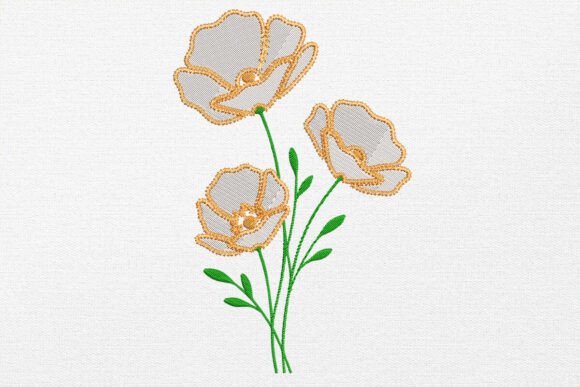
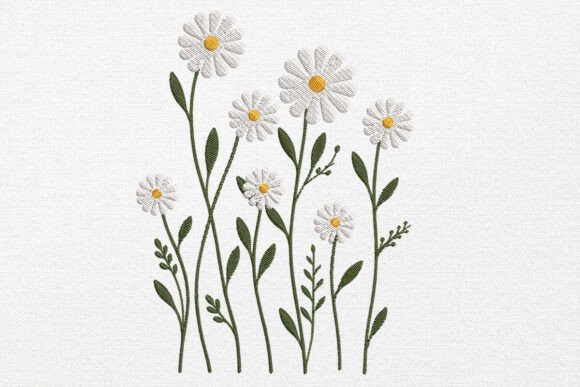
Opening this design for the first time, I saw exactly what a thoughtful line-art style should be. The daisy sits at the center with a loose, hand-drawn feel that avoids looking stiff or overly digitized. The surrounding wildflowers add balance without clutter. The overall mood is calm, organic, and slightly romantic. It reads as modern but not trendy in a disposable way. If you build a handmade product around this design, it will feel intentional. This is not a dense, heavy fill design. It breathes. That makes it a strong candidate for projects where you want the fabric to show through and the embroidery to feel like part of the material rather than a patch stuck on top.
The minimalist approach also means it fits naturally into the Wedding Flowers category. Brides and couples looking for subtle, elegant details on personalized gifts or reception decor will respond to this aesthetic. It doesn’t scream wedding. It whispers it. That’s a valuable quality for anyone creating nuptial-related merchandise or custom orders for clients who want something understated.
Stitching It Out: How This Design Performs on Real Projects
I started with a tote bag made from medium-weight cotton canvas. This is my default test because tote bags reveal everything about a design’s structural integrity. The Daisy Flower Embroidery Design stitched cleanly with no skipped stitches or pull issues. The satin stitch elements held their shape, and the running stitch details stayed crisp. I used a tear-away stabilizer and a standard sharp needle. No surprises. That is exactly what you want from an embroidery file when you are producing for a craft business or small shop product.
Next, I moved to a sweatshirt. This is where many designs fail because knit fabric stretches and distorts under dense stitching. The daisy design handled it well. The open layout means the fabric breathes, and the stitch density is light enough that the garment retains its drape. I used a cut-away stabilizer and a ballpoint needle to protect the knit. The result was a soft, wearable piece of custom apparel that felt like something a boutique customer would actually pay for. If you sell personalized gifts or run an Etsy shop focused on modern embroidery, this design belongs in your library.
I also tested it as an embroidered patch on a denim jacket. Because the design has a clear outline and reasonable size, it worked beautifully as a standalone patch. I stitched it onto water-soluble stabilizer first, then applied it to the jacket. The line-art style translated well to a patch format because the open areas didn’t trap excess stabilizer or create stiffness. This is a versatile machine embroidery design that moves easily between direct-to-garment stitching and patch production.
Where This Design Shines — and Where to Think Twice
The Daisy Flower Embroidery Design is a natural fit for:
- Custom apparel like sweatshirts, t-shirts, and tote bags where a relaxed boho look is desired
- Baby embroidery in soft pastel thread colors on onesies or receiving blankets
- Holiday gifts and wedding gifts where a personal, handmade touch matters
- Nursery decor pillow covers, wall hoops, and framed hoop art
- Boutique branding for small shop products that need a consistent aesthetic
- Craft fair merchandise that needs to catch a browser’s eye without screaming for attention
- Printable mockups and digital embroidery file previews for Etsy listings or design assets
That said, I want to be honest about where you should approach this embroidery project with more caution. The design relies on thin, graceful lines. On very dark fabric, those lines can disappear if your thread color doesn’t pop. Test it in a white or cream thread on black fabric before committing to a production run. The same applies to textured fabrics like heavy linen or boucle. The detail can get lost in the weave. I recommend a stabilizer with a bit more body when stitching on textured surfaces, and a sharp needle to keep the stitch definition clean.
If you plan to use this design on caps or curved surfaces, pay attention to the hoop size. The design’s open layout means it can distort if the fabric is pulled too tight in a small hoop. I would not recommend it for a fitted cap front unless you are comfortable with careful hooping and a firm stabilizer. For flat or gently curved surfaces, it performs reliably.
Also consider the product’s end use. For items that will face frequent washing like kitchen towels, baby bibs, or everyday tote bags, the line art holds up well because it doesn’t trap moisture or create stiff areas that crack over time. However, I recommend a light layer of cut-away stabilizer on the back for anything that will see regular laundry cycles. This preserves the integrity of the embroidery file over the life of the product.
What This Design Does for Your Product Line and Customer Trust
When you build a handmade product around a well-chosen machine embroidery design, you are making a promise about taste. The Daisy Flower Embroidery Design communicates a specific sensibility. It says the maker values restraint over clutter, and quality over quantity. For a small shop product or Etsy seller, that is a powerful message. Buyers who respond to minimal, modern embroidery are often willing to pay more because they perceive higher design value. They are also more likely to return for custom apparel or personalized gifts because they trust your eye.
In my experience, designs like this one also photograph well for listings. The open lines and natural shape create strong visual contrast without looking busy. That translates to better click-through rates on digital product previews and printable mockups. If you sell digital embroidery files, this design will present well in your shop. If you sell finished products, it will look clean and intentional in your marketing photos.
For wedding and gift buyers specifically, the floral motif without heavy ornamentation feels timeless. A bride buying a personalized tote for her bridal party wants something elegant but not fussy. A customer looking for a baby shower gift wants something sweet but not saccharine. This design hits that middle ground. It also works across gender lines, which is helpful if you are building a general gift line rather than a niche product.
Designer Notes Before You Stitch
Before you load this embroidery file into your machine, here are the practical checks I recommend based on my testing:
- Test on scrap fabric first. Cut a piece of your intended base material and stitch the design out. Check thread tension, stitch clarity, and any distortion. This is the single most important step for any embroidery project.
- Review thread color contrast. This design shines with a single color on a contrasting background. A dark thread on a light fabric or a light thread on a dark fabric. Avoid mid-tone matches where the stitching blends into the background.
- Check stitch density if you plan to scale the design up or down. The open line-art style is forgiving, but extreme resizing can change how the satin stitch fills behave. Always stitch a test at your target size.
- Confirm hoop size before you start production. The design fits well in a standard 4x4 hoop, but if you are working with a smaller hoop or a multi-needle machine, confirm the dimensions against your capabilities.
- Inspect small details in the design preview. Look for any tiny elements that might not stitch cleanly at your intended size. If something looks fragile in the digital file, it will likely be fragile in the stitched product.
- Test it in black and white mockups. Print a grayscale version of the design and place it against your fabric. This helps you see contrast and scale without wasting thread.
- Use proper stabilizer. For most woven fabrics, a tear-away works well. For knits and stretchy materials, go with cut-away. For very thin fabrics like silk or rayon, use a lightweight water-soluble stabilizer on top.
- Confirm licensing before selling finished items or digital products. Always check the terms of your embroidery file purchase. Some designs are for personal use only, while others allow commercial embroidery. Know what you are allowed to do before you list that tote bag or sweatshirt in your shop.
These steps may sound basic, but I have seen too many beautiful digital embroidery files fail in production because someone skipped the test stitch. The Daisy Flower Embroidery Design is reliable, but every fabric and machine combination behaves differently. Take the extra fifteen minutes to verify and you will save yourself the frustration of a ruined garment.
Final Verdict: Should You Add This to Your Digital Library?
I have been testing and reviewing machine embroidery designs long enough to know that a strong design is one you can trust across multiple projects without constant adjustments. The Daisy Flower Embroidery Design earns that trust. It is versatile enough for custom apparel, handmade products, and personalized gifts. It is subtle enough for wedding and baby projects, and it has enough visual personality to stand alone as hoop art. It will serve a small business owner who needs a reliable design for production runs, and it will serve a hobbyist who wants one beautiful finished product for their home.
If you are building a craft business or an Etsy shop, this is the kind of embroidery file that becomes a workhorse. It stitches cleanly, photographs well, and sells itself to customers who appreciate modern, minimalist aesthetics. Add it to your library, test it on your preferred fabric, and put it to work.